
ChatGPT Image 2.0 生成圖像提示詞指南(Prompt Guide)
ChatGPT Image 2.0 的重點,不只是「畫圖」,而是:
- 理解自然語言
- 理解構圖與攝影語意
- 支援中文提示詞
- 能生成寫實、插畫、資訊圖表、海報、UI、角色設計等多種風格
- 可進行局部修改(修圖)
- 能理解版面與文字配置需求
下面我用「實戰型教學」方式整理給您。
一、Image 2.0 提示詞的黃金公式
建議使用以下結構:
【主體】+【風格】+【場景】+【光線】+【構圖】+【細節】+【畫質】
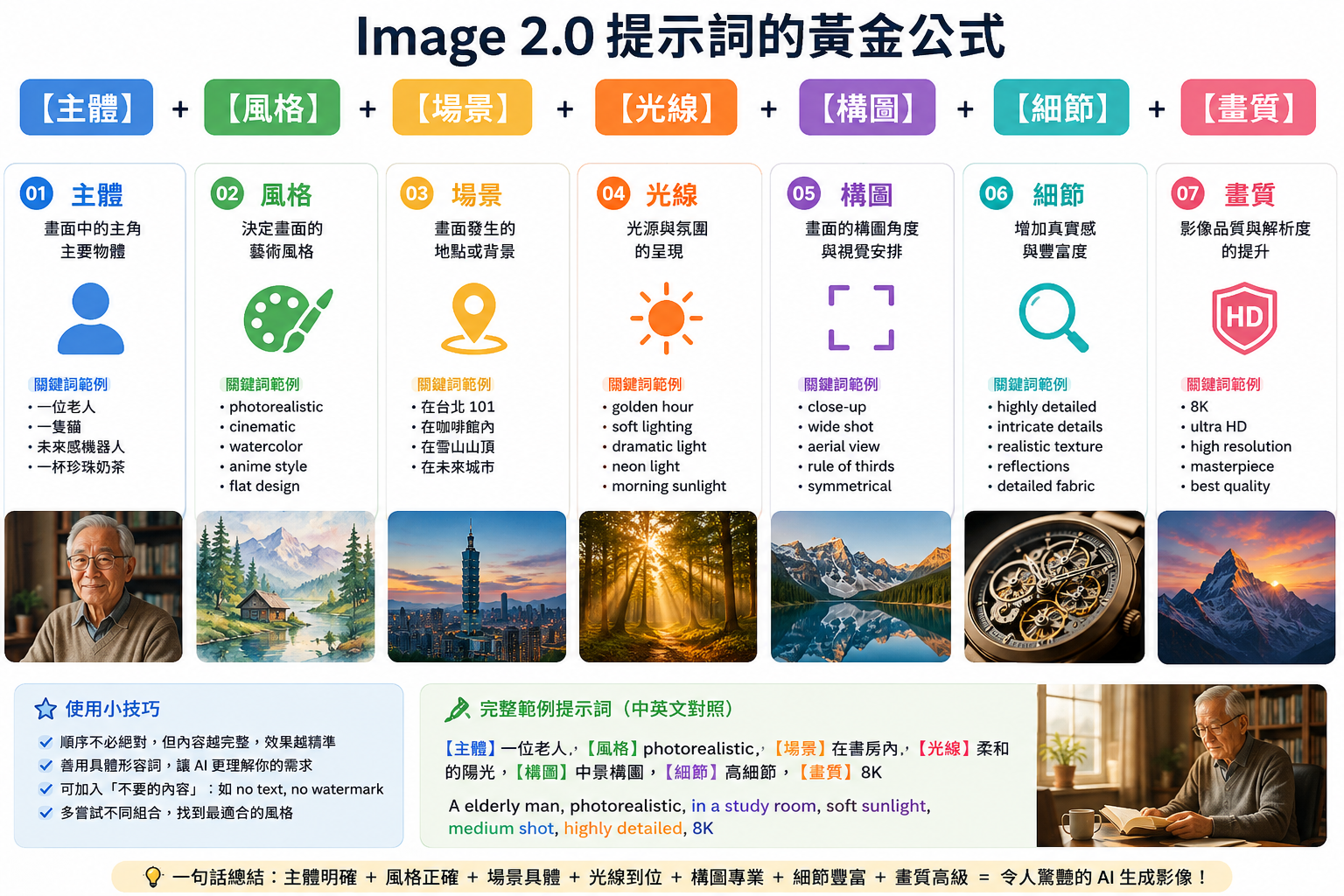
二、提示詞七大核心元素
1️⃣ 主體(Subject)
先說「畫什麼」。
範例
- 一位正在閱讀書籍的老人
- 台灣夜市中的珍珠奶茶攤位
- 未來感 AI 機器人
- 北海道雪景中的木屋
2️⃣ 風格(Style)
決定圖像靈魂。
常見風格
寫實攝影風格
- photorealistic
- cinematic
- DSLR photo
- ultra realistic
範例
photorealistic portrait of an elderly Taiwanese man
插畫風格
- watercolor
- anime style
- Studio Ghibli style
- children's book illustration
範例
watercolor illustration of a mountain village
平面設計風格
- infographic
- minimal design
- flat illustration
- vector art
範例
modern infographic about generative AI
3️⃣ 場景(Environment)
描述背景。
範例
- 在台南老街
- 在北海道雪地
- 在未來城市
- 在咖啡館內
4️⃣ 光線(Lighting)
AI 非常吃光線描述。
常用光線詞
- golden hour
- soft lighting
- dramatic lighting
- neon light
- morning sunlight
範例
soft warm lighting, cinematic shadows
5️⃣ 構圖(Composition)
這是高手關鍵。
常見構圖
- close-up
- wide shot
- aerial view
- top view
- symmetrical composition
- depth of field
範例
close-up portrait with shallow depth of field
6️⃣ 細節(Details)
讓畫面更精緻。
常用細節詞
- highly detailed
- intricate details
- realistic skin texture
- reflections
- detailed fabric
7️⃣ 畫質(Quality)
最後提升品質。
常用詞
- 8K
- ultra HD
- masterpiece
- high resolution
三、最推薦的提示詞寫法(實戰版)
範例 1:寫實人物攝影
中文提示詞
一位 65 歲台灣男性,戴眼鏡,正在書房使用電腦研究人工智慧,桌上有筆記本與咖啡,窗外陽光灑入,寫實攝影風格,電影感光線,高細節,淺景深,8K
英文提示詞(效果通常更強)
A 65-year-old Taiwanese man wearing glasses, studying artificial intelligence on a computer in a cozy study room, notebook and coffee on the desk, warm sunlight through the window, photorealistic, cinematic lighting, shallow depth of field, highly detailed, 8K
範例 2:AI 科技海報
提示詞
futuristic AI technology poster, glowing neural networks, blue cyberpunk atmosphere, holographic interface, cinematic lighting, ultra detailed, modern typography layout, high-tech style, 8K
範例 3:北海道旅遊插畫
提示詞
beautiful winter scenery in Hokkaido, wooden cabin covered with snow, Japanese countryside, soft snowfall, warm light from windows, Studio Ghibli style, dreamy atmosphere, watercolor illustration
範例 4:資訊圖表(非常實用)
提示詞
clean modern infographic about Generative AI applications, sections for text generation, image generation, video generation, coding assistant, business AI tools, flat design, blue and white color scheme, professional presentation layout
四、高手級技巧(非常重要)
1️⃣ 使用「鏡頭語言」
效果會暴增。
範例詞
- 85mm lens
- cinematic shot
- macro photography
- bokeh
- DSLR
範例
cinematic portrait, 85mm lens, shallow DOF
2️⃣ 加入「情緒氛圍」
AI 很吃氣氛。
範例
- peaceful
- nostalgic
- inspiring
- futuristic
- cozy
- dramatic
3️⃣ 使用「色彩控制」
範例
- warm orange tones
- blue cyberpunk palette
- pastel colors
- monochrome
4️⃣ 明確指定「不要什麼」
很重要。
範例
no blurry face, no extra fingers, no watermark, no text
五、ChatGPT Image 2.0 最強應用場景
1️⃣ 社群行銷圖
Facebook、IG、廣告圖。
2️⃣ AI 簡報配圖
教學超好用。
3️⃣ 部落格封面
WordPress 非常適合。
4️⃣ 電商商品圖
尤其適合:
- 食品
- 保健品
- 文創商品
5️⃣ 教學教材
您是電腦教學老師,這會非常強大:
- AI 教學圖
- 流程圖
- Office 教材
- Access 教學
- 資訊圖表
六、常見錯誤(很多人會犯)
❌ 太短
不好:
畫一個機器人
太模糊。
❌ 太混亂
不要同時:
- 水彩
- 寫實
- 像素風
- 油畫
AI 會混亂。
❌ 沒有主體
AI 不知道重點。
七、超實用萬用模板(推薦收藏)
📌 寫實攝影模板
[主體],在[場景],[光線],photorealistic, cinematic lighting, highly detailed, shallow depth of field, 8K
📌 插畫模板
[主體],[場景],watercolor illustration, soft colors, dreamy atmosphere, highly detailed
📌 海報模板
modern poster design about [主題], futuristic style, clean typography, cinematic lighting, high detail
📌 資訊圖表模板
modern infographic about [主題], clean layout, professional design, flat illustration, blue and white color palette
八、給您的專業建議(非常適合您)
您本身有:
- Microsoft Office 教學
- WordPress 開發
- Photoshop 經驗
- AI 教學興趣
建議您優先學習:
第一階段
「資訊圖表生成」
因為:
- 最容易商業化
- 最適合教學
- 最容易接案
第二階段
「AI 行銷圖生成」
可搭配:
- WooCommerce
- Facebook 行銷
- 電商商品圖
第三階段
「AI 教材生成」
您非常適合:
- AI Office 教材
- AI Access 教材
- AI 簡報教材
九、推薦練習題(立即有效)
練習 1
生成:
「生成式 AI 應用領域資訊圖表」
練習 2
生成:
「未來感 AI 教室」
練習 3
生成:
「台灣養生食品 Facebook 廣告圖」
十、進階技巧(真正高手)
高階玩家會用:
「分層提示」
例如:
主體層
elderly Taiwanese teacher
場景層
modern AI classroom
光影層
cinematic warm lighting
品質層
ultra realistic, highly detailed, 8K
這樣生成品質會穩定很多。
如果您願意,我下一步還可以幫您製作:
- 「ChatGPT Image 2.0 中文提示詞大全」
- 「100 個 AI 圖像生成風格關鍵字」
- 「AI 行銷海報提示詞範本」
- 「資訊圖表專用提示詞模板」
- 「台灣電商商品圖 AI 提示詞大全」
- 「AI 教學教材圖片生成指南」
甚至可以直接幫您做成:
- PDF 教學手冊
- 圖文並茂資訊圖表
- PowerPoint 教學簡報
- 可列印教材。